
If you’ve ever uploaded a file and wondered whether you just ruined your print job by not “converting to CMYK”… welcome. This is the real-world version of RGB vs CMYK for online printers, where we ignore internet rituals and focus on what actually changes the final print.
Because here’s the uncomfortable truth: most “RGB vs CMYK” advice is technically correct and practically useless. Online printers don’t print your file the way your design app previews it. They run it through preflight, conversion rules, ICC profiles, and a RIP that makes choices on your behalf. Sometimes those choices are great. Sometimes they turn your electric blue into “sad denim.”
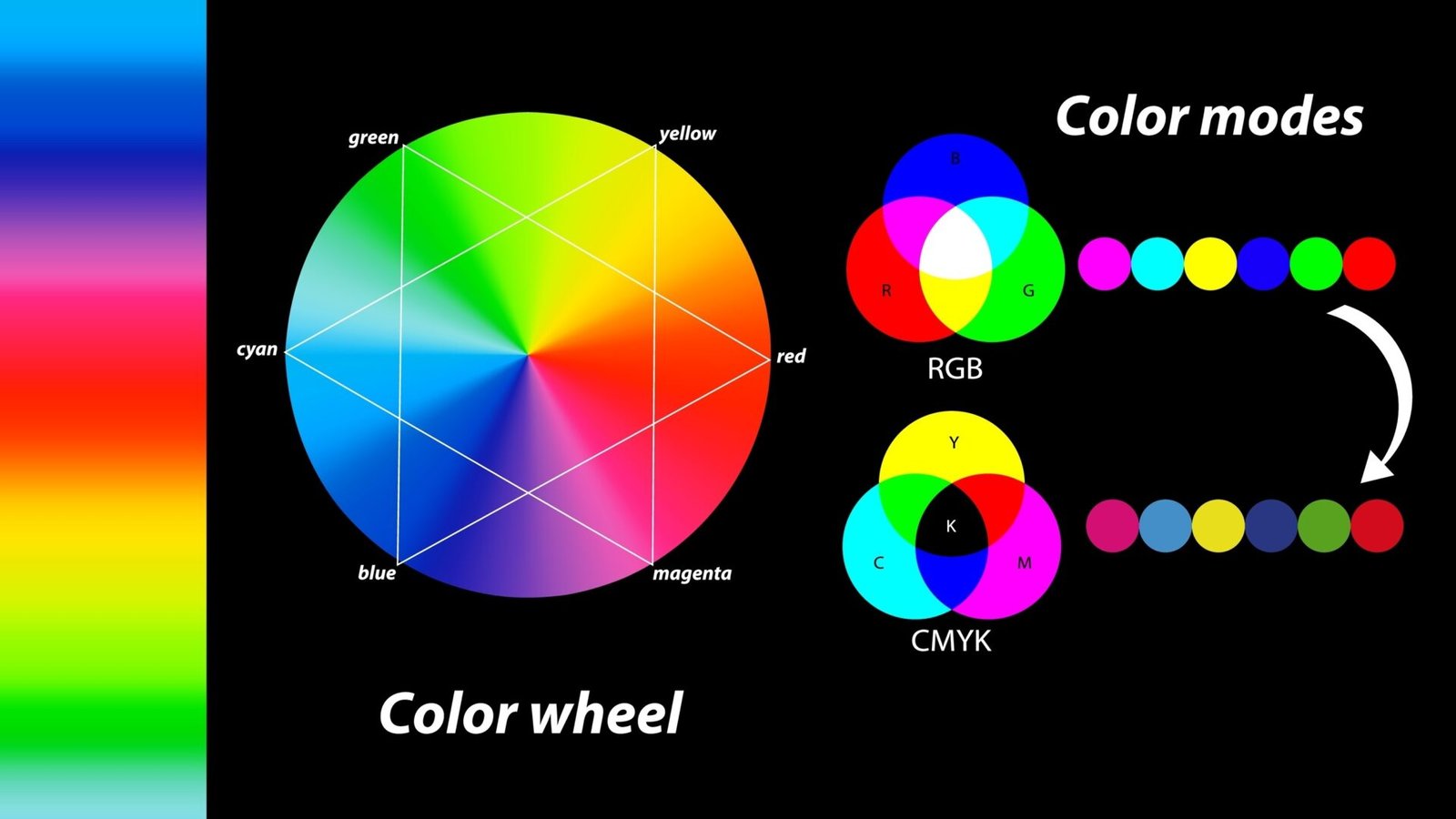
RGB vs CMYK
RGB is light. Screens emit it. It’s big, bright, and capable of colors ink cannot reproduce (neons, some saturated blues, certain greens).
CMYK is ink. Paper reflects it. It’s smaller, more limited, and it behaves differently depending on paper, coating, and press conditions.
So yes, CMYK is “for print.” But online printing workflows complicate that sentence.
What online printers actually do with your file
Most online printers fall into one of these workflows:
1) “CMYK-only” intake (common in trade printing)
They’ll ask for a print-ready PDF, often PDF/X-1a, which typically forbids RGB elements. This is about predictability: fewer surprises, fewer support tickets, fewer “why is my logo purple?” emails.
2) “RGB allowed, we convert it” intake (common in consumer-friendly platforms)
They accept RGB uploads (sometimes even JPG/PNG) and convert everything to their house CMYK profile in the RIP. This can look fine for photos and casual designs, but it can be risky for logos and brand colors.
3) Color-managed PDF workflows (more modern, more consistent when done right)
This is where standards like PDF/X-4 show up. RGB can exist inside the file, but conversion is supposed to be governed by embedded profiles and an output intent.
The punchline: your file almost always becomes CMYK at print time. The real question is who controls the conversion and what profiles they use.
The 5 things that actually change your printed color
1) Embedded profiles (or the lack of them)
If your RGB artwork is tagged as sRGB, Adobe RGB, Display P3, or “untagged mystery meat,” the conversion result can change a lot. Many online workflows assume sRGB when they have to guess, which is not always what you designed in.
2) The CMYK target profile (SWOP vs GRACoL vs “house CMYK”)
CMYK is not one universal thing. Different print conditions use different characterizations and profiles. If you convert to a CMYK profile that doesn’t match the printer’s actual condition, you can get dull color or unexpected shifts.
3) Paper and finish
Coated stock holds saturation differently than uncoated. Matte lamination can visually mute dark tones. Gloss can make colors pop. Same file, different substrate, different result.
4) Black behavior (and small text risk)
Black text should usually be 100K, not a four-color “rich black,” especially for small type or fine lines. Four-color text can show color fringing if registration is even slightly off.
5) Total ink coverage (TAC)
If your file has heavy builds (especially in shadows and “rich black” backgrounds), you can exceed typical total ink coverage limits. That can cause muddy darks, drying issues, or weird-looking shadow detail depending on process and stock.
When to stay RGB (yes, really)
If you’re working with photos, gradients, or image-heavy artwork, staying RGB longer can be a good thing. A lot of pro workflows prefer editing in RGB and converting at the end, because RGB editing keeps more headroom and avoids early clipping.
This is especially true when:
- You’re not chasing a precise brand color match
- The printer’s pipeline is color-managed (or at least consistent)
- You can soft-proof against a realistic CMYK profile before exporting
If you remember one thing from this whole “RGB vs CMYK for online printers” debate: converting too early doesn’t magically make color accurate. It just locks in a conversion that might not match the printer’s setup.
When you should convert to CMYK before upload
Convert (or at least test convert) when you care about predictability in these areas:
- Logos and flat brand colors (especially blues, purples, and bright greens)
- Large flat backgrounds (banding and shifts get obvious fast)
- QR codes and small type (keep blacks clean and single-channel where possible)
- Anything where “close enough” is not acceptable
Also convert if the printer’s spec explicitly demands it (many will).
The practical workflow that avoids drama
If you want a simple, low-regret approach:
- Read the printer’s spec: do they want PDF/X-1a, PDF/X-4, or “any PDF”? Do they accept RGB?
- Keep images RGB until final export, then soft-proof if you can.
- For logos and solid brand colors, test a CMYK conversion and compare. If it gets ugly, adjust before export.
- Export to the required PDF standard, and make sure fonts are embedded and bleeds are correct.
- Proof like a skeptic: if the online proof looks off, don’t assume the press will “fix it.”
That’s it. No rituals. No “CMYK everything always.” Just controlled decisions.
Common myths (and what to do instead)
Myth: “RGB prints brighter, so always send RGB”
Reality: it converts to CMYK anyway. RGB can look better for photos in some pipelines, but it can also convert unpredictably for logos and flat colors.
Myth: “CMYK means accurate print color”
Reality: CMYK without the right profile is just different numbers that still need interpretation.
Myth: “My blacks look washed out because I didn’t use rich black”
Reality: sometimes your stock/finish is doing that. Sometimes your black build is wrong. Sometimes you’re exceeding ink limits and it’s turning into mud.
Final verdict
For most people, the winning strategy is boring: follow the printer’s spec, keep your color management sane, and control conversion where it actually matters (logos, solids, small type, and deep shadows). That’s the real answer to RGB vs CMYK for online printers.
If your printer can’t tell you what profiles or standards they want, assume they’re converting your file automatically and proof accordingly.