

PsPrint and PrintPlace both live in that trade-style, online printer world. They are not design marketplaces like Zazzle and not ultra-boutique shops like MOO or Jukebox. Both focus on production: thick 14 and 16 pt cardstocks, coatings, and fast turnaround for business clients.
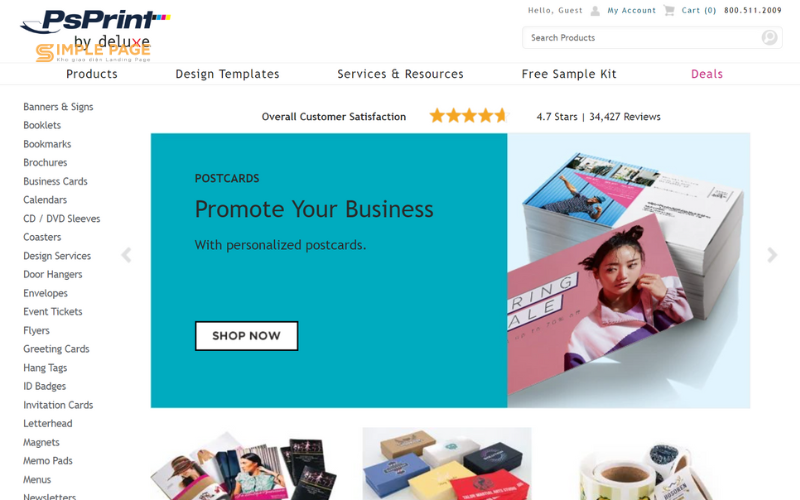
In our internal business card score table, PsPrint sits near the top of the multi-product printers on overall average, with especially strong marks for price, customer service, and quality. PrintPlace lands in the lower middle of the pack. It is still a competent printer, but it gives up ground on price and online tools. This PsPrint vs PrintPlace business cards comparison walks through each category so you know which one is a better fit for how you actually buy cards.
Quality (material and print)
PsPrint is in that sweet spot where the cards feel premium without getting precious. Their business cards are available on a range of stocks: ultra thick 16 pt gloss, smooth 15 pt velvet with soft touch, 13 pt 100 percent recycled matte, and elegant linen options. Standard, slim, and square formats all share these premium papers. PsPrint also runs as a G7 qualified printer, which is shorthand for tight color consistency across presses.
In practice, that combination works. The 16 pt and 15 pt stocks feel substantial in the hand and hold color well, especially with UV coating. Linen and recycled matte add texture when you want a softer, more tactile look. On top of that, PsPrint offers die cut cards, ultra triple-thick cards with colored cores, and colored paper stocks, so if you do want more flair, you are not stuck with basic rectangles. Their own review data on business cards sits in the high four-star range with a big majority of customers saying they would recommend the product, which matches what we see in hand.
PrintPlace’s standard business cards use 14 pt and 16 pt cardstock with your choice of gloss, matte, or high gloss UV coating. That is the classic formula: thick enough to feel like a real business card, not so thick that they jam in a wallet. Quality is generally good. Customer comments on their site talk about cards arriving “beautifully” printed on “thicker card stock” and looking better than expected after switching from bigger-name printers.
The main difference is consistency and where each company puts its energy. PrintPlace has a big menu of card products: standard, rounded corner, square, circle, oval, slim, plastic, foil, painted edge, silk, velvet, raised spot UV, and more. When spec’d up, those cards can look very polished. But our internal scoring still pegs PrintPlace’s overall card quality a notch below PsPrint. You see more scattered reports about occasional printing errors or reprints, and their base 14 pt options feel more like standard trade stock than premium.
If the only thing you care about is the physical card, PsPrint is slightly ahead on paper variety at the core sizes and on consistency. PrintPlace catches up when you start layering in special finishes and unusual card formats.
Price and value
PsPrint has one of the highest price scores in our table, and that is not an accident. They run constant percentage-off deals, often in the 40 to 60 percent range, and their base pricing on standard business cards is already competitive. Factor those promos in and you often end up paying surprisingly little per card for 16 pt gloss or 15 pt velvet. External roundups that look at “wholesale” style card pricing routinely call out PsPrint as a strong mix of affordability and quality rather than a rock-bottom-only option.
There are cheaper places on pure headline price if you only care about the cheapest 14 pt card you can find. But once you filter for printers that hit our minimum bar on quality and consistency, PsPrint’s 4.8 out of 5 price score makes sense. You get thick cards, real coatings, and decent options at a price that still feels firmly “budget friendly” for most small business runs.
PrintPlace is more complicated. Our scoring model gives them a much lower price mark overall, which reflects the fact that their small-run pricing is often higher than PsPrint or other budget-leaning printers. That shows up in the per-piece examples on their own “business card maker” page where small batches can look pricey.
At the same time, PrintPlace can be very aggressive at higher quantities. Their own examples show the per-card price dropping sharply as you move from a few hundred into the 1000-plus range, and they openly pitch themselves as a good fit for large quantity orders. Add in the big specialty menu and you can make the case that PrintPlace is good value if you need a lot of cards in a very specific format.
For typical small business orders of a few hundred premium cards, PsPrint usually wins on value. If you regularly buy in the thousands and you want specialty shapes or finishes, PrintPlace becomes more interesting.
Design templates and customization
PsPrint is not trying to be the Vistaprint of templates, but it does have an actual library. Their business card pages link to hundreds of ready-made designs by category, plus layout templates for designers, and an online editor that lets you swap text, colors, and images. The interface feels more trade printer than consumer web app, yet it is usable for non designers who are willing to click around a bit.
This lines up with how we rate PsPrint: above average on templates and tools for a trade-style printer. It is a good compromise for someone who might start from a template but cares more about paper and print quality than browsing a thousand quirky designs.
PrintPlace trends more toward “pro tools”. Standard and specialty card pages let you upload a file, design online, or download layout templates. There is a browser-based designer, but the emphasis is clearly on layout guidelines and pre-press specs rather than a giant gallery of finished designs. Our internal notes for PrintPlace call out that tools are mainly layout templates and that there is no deep, consumer friendly design studio.
If you want PsPrint vs PrintPlace business cards and you do not have a design yet, PsPrint is friendlier. If you are a designer or already have print-ready files, both will treat you fine, but PrintPlace does less hand-holding on the creative side.
Customer service
PsPrint scores at the top of our multi-printer list for customer service. Their own site highlights overall customer satisfaction in the mid to high four-star range, with about 94 percent of customers saying they would recommend the company. Business card specific ratings are also very strong, with lots of comments about “perfectly reproduced” cards, “better than expected” quality, and helpful staff walking customers through multi-point file checks. That matches third party commentary that talks about them fixing issues, reprinting problem jobs, and generally standing behind the product.
You can find negative reviews too, especially on general-purpose review platforms that tend to skew toward complaints, so PsPrint is not flawless. But across the board, the pattern is “usually great, occasionally frustrating” rather than the other way around. That is why we give them a full 5 out of 5 on customer service in our scoring model.
PrintPlace also has a strong service story, though not quite as bulletproof in our data. On its own site and review widgets, the company boasts thousands of customer reviews with an overall rating around 4.8 out of 5. Comments frequently praise “helpful customer service,” “easy upload and instructions,” and quick replacement when something goes wrong.
Zoom out to independent review aggregators and the picture becomes more mixed. Many customers rave about quality and speed, but some complain about occasional printing errors, shipping delays, or order handling mistakes that took time to resolve. We land on a 4 out of 5 for PrintPlace customer service: generally responsive and professional, but with enough rough edges that it does not match PsPrint’s track record.
Ordering experience and tools
PsPrint’s ordering flow looks like a classic online trade printer. You choose the type of business card you want, pick your size, stock, and coating, then either upload your file or choose a template. The interface surfaces design resources like layout guidelines and a blog for tips. It is not the slickest UI in this space, but it is clear and predictable once you understand basic print terminology.
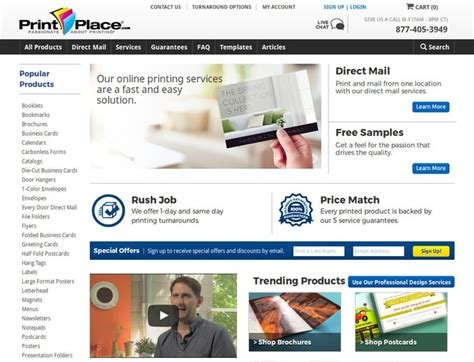
PrintPlace is similar, but with more branching. Their business card landing page lists a large number of distinct products: standard, rounded corner, square, circle, oval, slim, plastic, foil, silk, soft touch, and so on. Each option has its own configuration panel with size, stock, coating, turnaround, and quantity controls. You can either upload files, design online, or upload later.
The upside is flexibility. You can spec out very specific, multi-finish card projects without leaving the site. The downside is that the interface can feel busy, and the emphasis is clearly on production options rather than on helping a non designer build a card from scratch. Our tools score reflects that: PsPrint gets a bump for having more approachable design templates; PrintPlace trails behind because it assumes you already know what you are doing.
Turnaround time and shipping
PsPrint positions speed as one of its core strengths. Standard business card products advertise printing turnaround “as fast as one day” when you submit files by the cutoff time, and specialty categories like retail or real estate cards repeat that one-day printing promise. That does not include shipping, but in practice most customers report receiving cards within a few business days on standard ground shipping.
PrintPlace also pushes speed hard. Standard business cards can be printed the same day, next day, or within 2 to 5 business days depending on the option you select, and many of their specialty formats offer one-day or two-day production. Several customer reviews mention orders arriving earlier than expected, sometimes several days ahead of the promised delivery window. On the flip side, the mixed reviews we saw do include some complaints about shipping delays and missed dates, which is why our turnaround score for PrintPlace sits at a 3 rather than a 4 or 5.
If you need PsPrint vs PrintPlace business cards in a hurry, both can hit tight deadlines when everything goes right. PsPrint looks slightly more reliable in our data; PrintPlace matches or beats it on headline speed but wobbles a bit more on consistency.
Use cases and best for
Where PsPrint shines is as an all around safe choice. Strong print quality, genuinely thick stocks, good options, and very sharp pricing make it one of the best “default” picks in our entire business card lineup. It is ideal for small and mid sized businesses that want cards to feel a notch above the budget mills without paying boutique pricing. It is also a good fit for designers who want a trade style printer with decent templates and a straightforward upload pipeline.
PrintPlace makes the most sense when you care a lot about shapes and finishes or when your order sizes are large. If you want square, circle, oval, slim, plastic, foil, painted edge, or raised spot UV cards and you are comfortable dialing in specs yourself, PrintPlace has one of the broader menus in the mid market. It is also attractive for in house marketers and designers who are already familiar with print specs and want a quick way to configure complex jobs.

If you are a small business owner deciding between PsPrint vs PrintPlace business cards for a fairly standard rectangular card, we would push you toward PsPrint almost every time. If you are planning a bigger run of specialty shaped cards, and you do not need much help on the design side, PrintPlace becomes a more plausible choice.
Pros and cons
PsPrint pros
- High and consistent print quality on thick 16 pt, velvet, recycled, and linen stocks
- Excellent overall value pricing, especially with frequent percentage off promotions
- Good mix of formats and finishing, including ultra cards, colored paper, and die cut shapes
- Strong customer service track record with a high percentage of repeat and recommending customers
- Turnaround as fast as one day on many business card products
PsPrint cons
- Online tools and templates feel more “trade printer” than consumer friendly
- Not always the absolute cheapest option on tiny quantities if you do not catch a promo
- Website and interface can feel a bit dated compared with some newer competitors
PrintPlace pros
- Solid 14 pt and 16 pt cardstocks with gloss, matte, and high gloss UV coatings
- Very broad business card catalog, including square, circle, oval, slim, plastic, foil, painted edge, silk, velvet, and raised spot UV options
- Same day or next day printing available on many configurations
- Strong on site rating averages and many reviews praising quality, value, and helpful customer service
- Pricing becomes very competitive at higher quantities
PrintPlace cons
- Overall quality and price scores sit below PsPrint in our internal rankings
- Stock variety is broad in format but narrower than premium boutiques in terms of exotic papers
- Tools lean heavily on layout templates, with a less developed design studio experience
- More mixed reports on shipping delays and occasional production errors
Final verdict
In a straight PsPrint vs PrintPlace business cards matchup, PsPrint is the winner for most use cases. It delivers thicker, premium feeling cards, very consistent print quality, excellent value, and a strong record on customer service and reliability.
PrintPlace is not a bad choice. It is particularly appealing when you need unusual shapes, speciality finishes, or large quantity orders and you are comfortable working in a more production oriented interface. But if you just want great looking, solid business cards at a fair price without overthinking it, PsPrint is the safer and more satisfying default.